
Bulk WhatsApp Messaging: How to Send Bulk Messages Safely and Effectively
Bulk WhatsApp messaging allows businesses to send messages to a large number of customers at the same time. It can be useful for sharing promotions, product updates, appointment reminders, order notifications, event invitations, and other important business information. When used correctly, bulk messaging can save time and help businesses communicate with customers more efficiently.
In this guide, we’ll explain how bulk WhatsApp messaging works, whether it is allowed, and the difference between using the WhatsApp Business App and WhatsApp Business API. You’ll also learn about message templates, safe sending practices, personalization, common business use cases, and how to improve your campaign results. We’ll also show you how to send bulk WhatsApp messages through XSend and explain how to avoid spam-like messaging.
- What Is Bulk WhatsApp Messaging?
- How Does Bulk WhatsApp Messaging Work?
- WhatsApp Business App vs WhatsApp Business API for Bulk Messaging
- Is Bulk WhatsApp Messaging Allowed?
- WhatsApp Message Templates for Bulk Messaging
- How to Send Bulk WhatsApp Messages Safely
- Common Mistakes to Avoid
- How to Send Bulk WhatsApp Messages Through XSend
- Benefits of Bulk WhatsApp Messaging for Businesses
- Message Personalization
- How to Improve Bulk WhatsApp Campaign Results
- Bulk WhatsApp Messaging vs Spam
- Bulk WhatsApp Messaging Use Cases
- Conclusion
What Is Bulk WhatsApp Messaging?
Bulk WhatsApp messaging is the process of sending the same or similar message to multiple customers through WhatsApp. Instead of sending messages individually, businesses can use a suitable WhatsApp Business solution to reach many customers in a more organized way.
For example, a retail store can send a new product announcement to its customer list, while a restaurant can notify customers about a special offer or upcoming event.
However, bulk messaging does not mean sending unlimited messages to random WhatsApp users. Businesses need to follow WhatsApp’s policies and communicate with customers who have given appropriate permission to receive messages.
How Does Bulk WhatsApp Messaging Work?
Bulk WhatsApp messaging generally involves a few important steps:
- Build a customer list – Collect customer phone numbers through legitimate business interactions.
- Obtain customer consent – Make sure customers have agreed to receive WhatsApp communications.
- Create your message – Prepare a clear and relevant message for your audience.
- Use XSend for Bulk Messaging – With XSend, you can send bulk WhatsApp messages safely through the official WhatsApp Business Platform.
- Use approved message templates when required – Business-initiated messages outside the customer service window generally require approved templates.
- Send the campaign – Select the intended audience and send the message.
- Monitor results – Track delivery, engagement, responses, and other available campaign metrics.
This process helps businesses manage large-scale WhatsApp communication while reducing the risk of poor customer experiences.
WhatsApp Business App vs WhatsApp Business API for Bulk Messaging
Feature | WhatsApp Business App | WhatsApp Business API |
Individual messaging | Yes | Yes |
Bulk campaign management | Limited | Yes |
Automation | Limited | Yes |
Chatbots | Limited | Yes |
CRM integration | Limited | Yes |
Team inbox | Limited | Yes |
Message templates | Basic | Required for many business-initiated messages |
For businesses planning regular bulk campaigns, the WhatsApp Business Platform is generally the more suitable option.
Is Bulk WhatsApp Messaging Allowed?
Yes, businesses can send bulk messages through the WhatsApp Business Platform, but they must follow WhatsApp’s messaging policies and obtain customer consent (opt-in) before sending promotional messages.
Customers should clearly know what type of messages they will receive. For example:
“Would you like to receive product updates, offers, and important notifications from us on WhatsApp?”
Businesses should also provide an easy way for customers to stop receiving promotional messages when applicable. Sending unwanted messages can lead to customers blocking or reporting the business, which may affect messaging quality and account status.
A permission-based customer list is more valuable than simply having a large list of contacts.
WhatsApp Message Templates for Bulk Messaging
Businesses using the WhatsApp Business Platform generally need approved message templates for initiating conversations with customers outside the customer service window.
Templates can be created for different business purposes, such as:
- Account Updates
- Appointments & Reminders
- Payments & Billing
- Order Management
- Shipping & Delivery
- Support & Customer Care
- Promotions & Offers
- Re-engagement
- Lead Generation
- OTP & Authentication
- Feedback & Reviews
A good template should be clear, relevant, and useful to the recipient.
For example:
Promotional message:
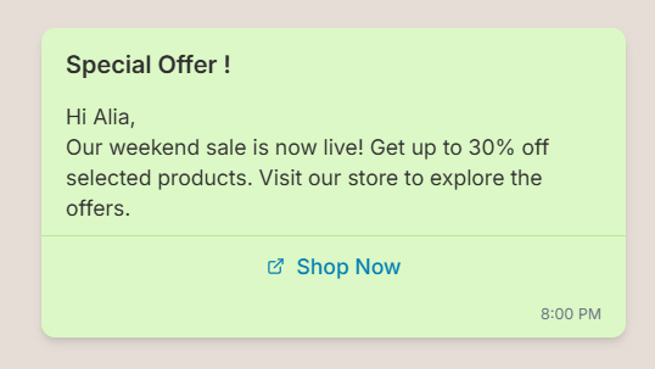
The exact template category and eligibility depend on WhatsApp’s current policies and review process.
How to Send Bulk WhatsApp Messages Safely
Follow these simple practices to make your bulk WhatsApp campaigns safe and effective:
1. Target Relevant Customers
Segment customers based on purchase history, location, interests, or previous interactions and send relevant messages.
2. Get Proper Opt-In
Send messages only to customers who have agreed to receive communications. Avoid purchased or scraped contact lists.
3. Provide Useful Content
Keep messages clear, relevant, and valuable instead of sending overly promotional content.
4. Avoid Excessive Messaging
Maintain a reasonable sending frequency and avoid unnecessary campaigns that may annoy customers.
5. Personalize Messages
Use details such as the customer’s name, order, location, or interests to make messages more relevant.
6. Respect Opt-Out Requests
If customers no longer want promotional messages, respect their preference and stop sending them.
Common Mistakes to Avoid
Businesses often make mistakes when starting WhatsApp bulk messaging.
Sending Messages to Purchased Lists
Purchased databases may contain people who never agreed to receive your messages. This can lead to poor engagement, blocks, and reports.
Sending Too Many Messages
Frequent promotional messages can frustrate customers and reduce engagement.
Using Misleading Content
Avoid exaggerated claims, misleading offers, or messages that do not match what the customer expects.
Ignoring Message Quality
Poorly written messages with spelling mistakes, excessive emojis, or unclear calls to action can make your business look unprofessional.
Sending Irrelevant Campaigns
A customer interested in one product category may not be interested in every promotion your business sends.
How to Send Bulk WhatsApp Messages Through XSend
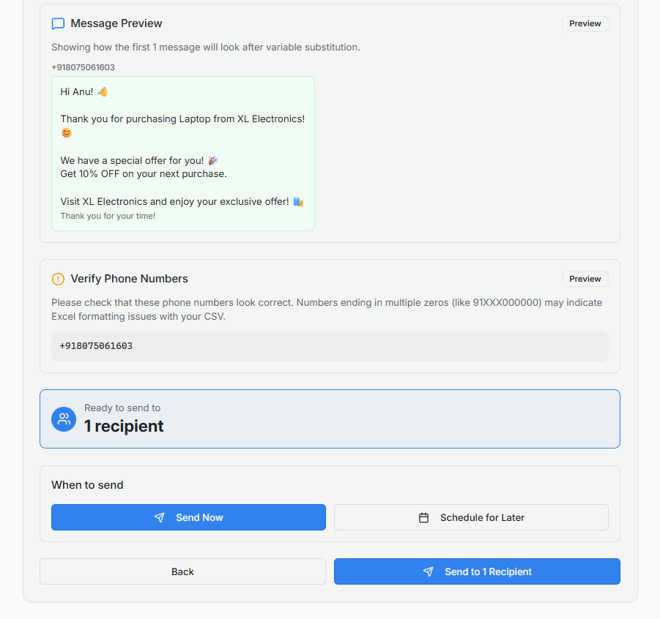
Sending bulk WhatsApp messages through XSend is simple and can be done in 3 easy steps:
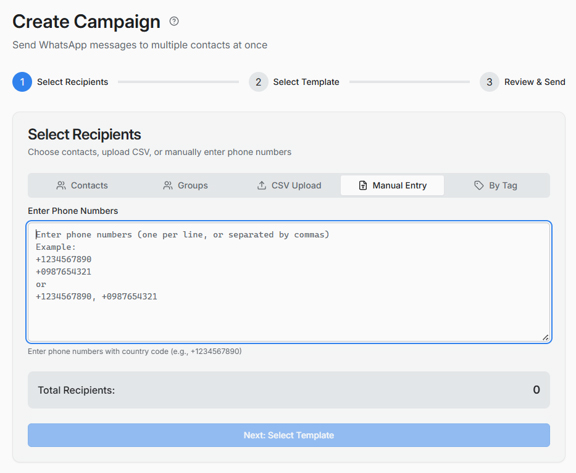
1. Select Recipients
Choose the contacts you want to message from your contact list, groups, CSV upload, manual entry, or tags.
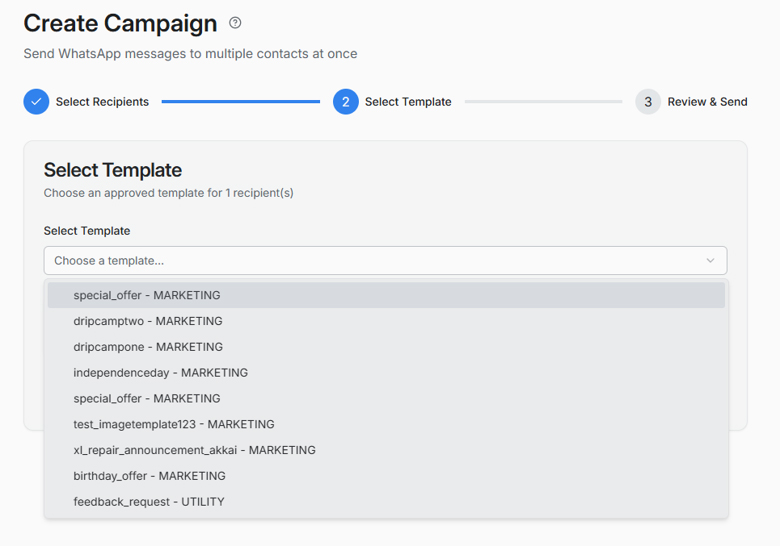
2. Select a Template
Choose an approved WhatsApp message template for your campaign.
3. Review & Send
Verify the selected numbers and message content. Once everything is correct, click Send to deliver the message.
Benefits of Bulk WhatsApp Messaging for Businesses
When used responsibly, bulk WhatsApp messaging can provide several benefits.
Faster Communication
Businesses can communicate with many customers without manually sending the same message one by one.
Better Customer Engagement
WhatsApp is a direct communication channel, making it useful for updates, offers, reminders, and customer interactions.
Automation
Businesses can automate notifications, follow-ups, reminders, and other repetitive communication.
Integration With Business Tools
The WhatsApp Business Platform can be integrated with CRM systems, e-commerce platforms, customer support tools, and other business applications.
Message Personalization
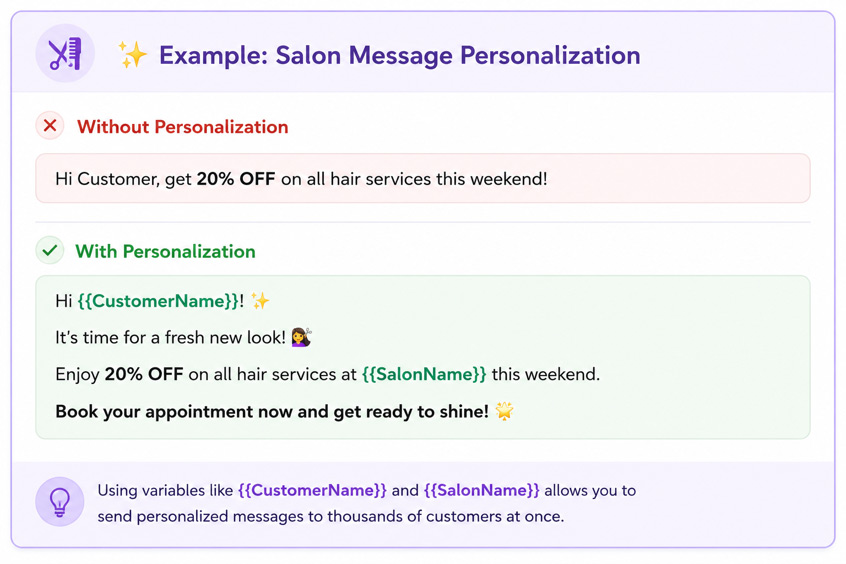
Make your bulk WhatsApp campaigns feel more personal and relevant with dynamic message personalization. Instead of sending the same generic message to every customer, you can automatically include details such as the customer’s name, order ID, product details, appointment information, or other custom data using variables like {{CustomerName}} and {{OrderID}}.
This helps businesses create more engaging communication at scale while maintaining a personal connection with every customer. Personalized messages can improve customer engagement, response rates, and overall campaign effectiveness.
How to Improve Bulk WhatsApp Campaign Results
After sending a bulk WhatsApp campaign, review the campaign report to understand how customers responded. Check metrics such as delivery, read, failed, and sent messages to identify areas for improvement.
To get better results:
- Send relevant content to the right audience.
- Use clear and engaging message templates.
- Personalize messages with customer details when possible.
- Choose the right time to send campaigns.
- Avoid sending messages too frequently.
- Monitor failed and unread messages and improve future campaigns.
- Use campaign reports to understand what works best.
This helps businesses continuously improve their WhatsApp campaigns and achieve better customer engagement.
Review Your Bulk Campaign Reports
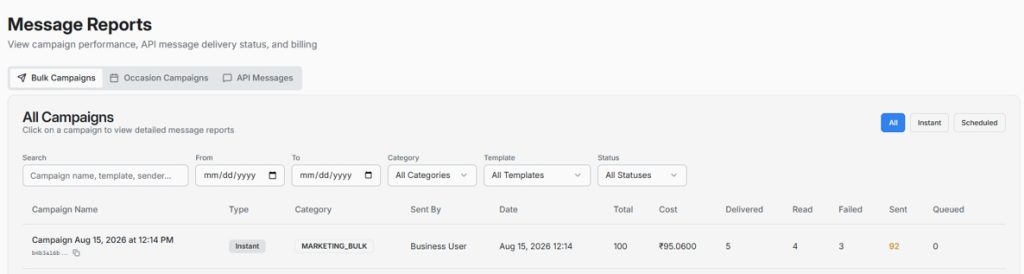
XSend provides detailed bulk campaign reports to help you track campaign performance. You can view important metrics such as sent, delivered, read, and failed messages in one place. Reviewing these results helps you understand customer engagement and make better decisions for your future WhatsApp campaigns.
Here’s an example of the bulk campaign report in XSend:
Bulk WhatsApp Messaging vs Spam
Bulk messaging and spam are not the same thing.Bulk messaging is legitimate business communication sent to an appropriate audience with relevant content and proper consent.Spam generally involves unwanted, excessive, irrelevant, or unauthorized messages.
The goal should not simply be to send the maximum number of messages. The goal should be to reach the right customers with the right message at the right time.
Bulk WhatsApp Messaging Use Cases
Retail and E-commerce
Businesses can send:
- New product announcements
- Sale notifications
- Back-in-stock alerts
- Order updates
- Promotional campaigns
Restaurants
Restaurants can send:
- Special offers
- New menu announcements
- Event promotions
- Reservation reminders
Education
Educational institutions can use WhatsApp for:
- Admission announcements
- Course updates
- Class reminders
- Event notifications
Healthcare
Businesses can use WhatsApp for appropriate customer communications such as:
- Appointment reminders
- Schedule updates
- Service notifications
Real Estate
Real estate businesses can share:
- New property listings
- Property updates
- Site visit reminders
- Customer follow-ups
Conclusion
Bulk WhatsApp messaging can help businesses reach customers faster, promote products, send updates, and improve engagement. With XSend, businesses can manage bulk campaigns through the official WhatsApp Business Platform while using templates, personalization, and campaign reports. By targeting opted-in customers, sending relevant content, and following WhatsApp’s policies, businesses can use bulk messaging safely and effectively for long-term growth.
Frequently Asked Questions
1. Can I send bulk WhatsApp messages from the WhatsApp Business App?
The WhatsApp Business App has some broadcast functionality, but it is not designed for large-scale business messaging and automation. Businesses that need advanced bulk messaging features generally use the WhatsApp Business Platform.
2. Is WhatsApp bulk messaging legal?
Businesses can use WhatsApp for legitimate customer communication, but they must follow applicable laws and WhatsApp’s Business and Commerce policies. Customer consent and responsible messaging are important.
3. How can I send bulk WhatsApp messages without getting blocked?
Use a legitimate WhatsApp Business solution, message customers who have opted in, send relevant content, avoid excessive messaging, maintain good message quality, and follow WhatsApp’s policies.