
WhatsApp Coexistence: Use WhatsApp Business App and API Together
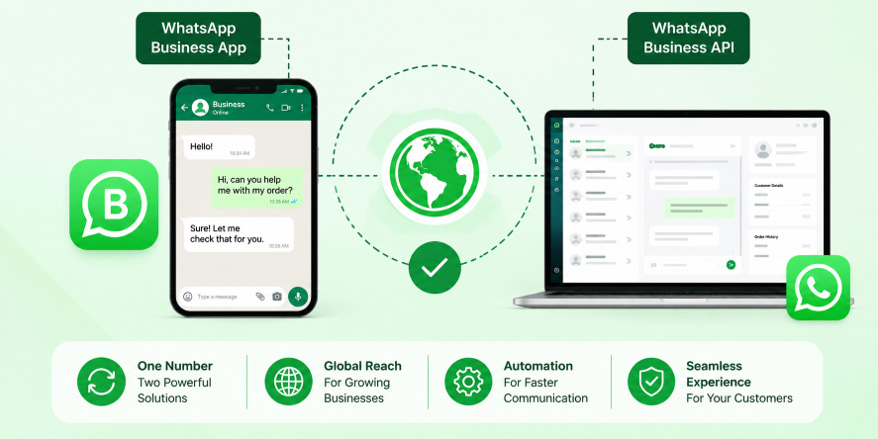
WhatsApp Coexistence allows businesses to use their existing WhatsApp Business App and WhatsApp Business Platform/API together on the same number. It combines familiar manual communication with automation, campaigns, chatbots, team inboxes, and CRM integrations, helping businesses scale customer communication without completely changing their existing WhatsApp workflow.
In this blog, we’ll cover what WhatsApp Coexistence is and how it works, compare the WhatsApp Business App and WhatsApp Business API, and explore its key benefits and suitable business types. We’ll also look at its use across different industries, explain how to set it up, what happens to existing WhatsApp chats, and the difference between full API migration and Coexistence.
- What Is WhatsApp Coexistence?
- How Does WhatsApp Coexistence Work?
- WhatsApp Business App vs WhatsApp Business API: What’s the Difference?
- Key Benefits of WhatsApp Coexistence for Businesses
- Who Should Use WhatsApp Coexistence?
- WhatsApp Coexistence for Different Industries
- How to Set Up WhatsApp Coexistence
- What Happens to WhatsApp Chats After Coexistence?
- WhatsApp Business API: Full Migration vs. Coexistence
- Conclusion
- Ready to Automate Your WhatsApp Business Communication?
What Is WhatsApp Coexistence?
WhatsApp Coexistence is a setup that allows a business to use its existing WhatsApp Business App and the WhatsApp Business Platform/API on the same phone number.
This means you can continue using the WhatsApp Business App for day-to-day conversations while connecting the same number to an API-powered platform for automation, customer communication, campaigns, integrations, and other business features.
For example, imagine you run a salon.
Your receptionist can continue answering customers manually through the WhatsApp Business App. At the same time, your WhatsApp API platform can automatically send:
- Appointment confirmations
- Appointment reminders
- Promotional campaigns
- Follow-up messages
- Customer feedback requests
The customer continues to communicate with the same business number.
That is the basic idea behind WhatsApp Coexistence.
Current documentation from WhatsApp solution providers describes Coexistence as the ability to onboard an existing WhatsApp Business App number to the WhatsApp Business Platform while retaining access to the app.
How Does WhatsApp Coexistence Work?
Think of Coexistence as having two ways of working with the same WhatsApp business number.
1. WhatsApp Business App
The business can continue using the WhatsApp Business App for manual conversations.
For example, an employee can open the app and personally answer:
“Yes, your appointment is confirmed for tomorrow at 4 PM.”
2. WhatsApp Business API
The API connects the same business number to a WhatsApp Business Platform or API-enabled software.
This can be used for things such as:
- Automated notifications
- Approved message templates
- Customer follow-ups
- Chatbots
- Campaigns
- CRM integrations
- Team inboxes
- Automated workflows
3. Customers Continue Using the Same Number
From the customer’s point of view, there is no need to learn a new number.They simply continue messaging the business on the WhatsApp number they already know.
So, instead of replacing the WhatsApp Business App with the API, Coexistence allows businesses to combine the two.
WhatsApp Business App vs WhatsApp Business API: What’s the Difference?
Feature | WhatsApp Business App | WhatsApp Business API |
Best for | Small businesses | Growing businesses |
Customer communication | Manual | Manual + automated through connected platforms |
Automation | Limited | Advanced |
Chatbots | Limited | Yes |
CRM integration | Limited | Yes |
Team management | Basic | Advanced |
Bulk/campaign messaging | Limited | Yes, with approved templates |
Scalability | Suitable for smaller volumes | Designed for larger-scale communication |
Key Benefits of WhatsApp Coexistence for Businesses
1. Continue Using Your Existing WhatsApp Business App
One of the biggest advantages is that businesses can continue using the WhatsApp Business App instead of completely abandoning the familiar app-based workflow.
This is especially useful for small businesses where the owner or a small team personally handles customer conversations.
You don’t have to immediately change the way your employees communicate with customers.
2. Use Your Existing Business Number
Changing a business WhatsApp number can be inconvenient.
Customers may already have the number saved. It may appear on your website, Google Business Profile, social media pages, brochures, invoices, advertisements, and other marketing materials.
Coexistence allows eligible businesses to connect their existing WhatsApp Business App number to the WhatsApp Business Platform.That means your customers can continue contacting the same business number.
3. Automate Repetitive Customer Messages
Businesses often spend a lot of time sending the same messages repeatedly.
For example:
- “Your appointment is tomorrow.”
- “Your payment has been received.”
- “Your delivery is on the way.”
- “Thank you for contacting us.”
- “Please share your feedback.”
Instead of sending every message manually, businesses can connect automation through the API.
This can save employees time and reduce repetitive work.
4. Run WhatsApp Marketing Campaigns
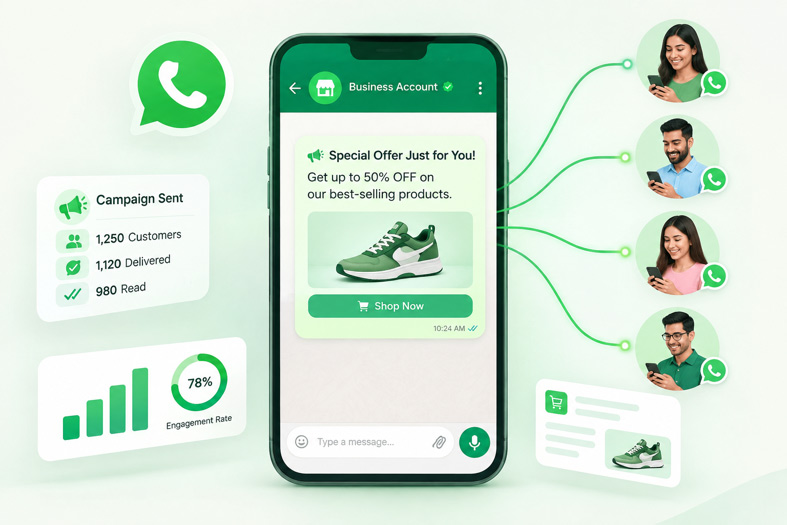
Reach your customers with targeted WhatsApp campaigns and keep them engaged after every purchase. Send personalized offers, discounts, product updates, and follow-up messages automatically to encourage repeat purchases and build stronger customer relationships.
5. Add Chatbots and Automated Replies
Automate customer conversations with WhatsApp chatbots and instant replies. Answer common questions, share information, collect customer details, and provide support automatically—even outside business hours.
6. Connect WhatsApp With Your CRM
Businesses often keep customer information in CRM systems.
A WhatsApp API integration can connect customer conversations with business systems and workflows.
For example:
Customer enquiry → WhatsApp → CRM → Sales follow-up
This can help sales teams keep track of leads instead of managing everything manually through individual WhatsApp chats.
For businesses that receive a large number of enquiries, this can make follow-ups much easier to manage.
7. Give Multiple Team Members Access
As a business grows, one person may not be able to handle every WhatsApp conversation.
A connected API platform can provide a shared inbox where multiple agents can manage customer conversations.
For example:
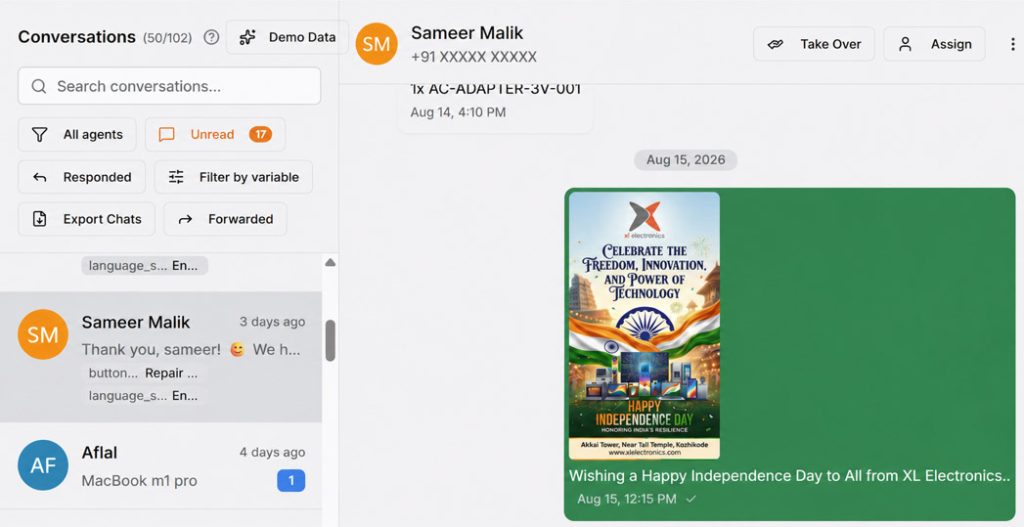
With team-based WhatsApp management, businesses can organize conversations by teams, such as Sales and Support, and assign chats to different agents. This ensures customers are not dependent on a single employee’s phone and helps teams manage customer communication more efficiently.
8. Combine Human Communication With Automation
Coexistence allows businesses to combine automation with human support. Automated messages can handle routine tasks like appointment confirmations, while human agents can step in when customers have specific questions or requests. This creates faster communication without losing the personal touch.
Who Should Use WhatsApp Coexistence?
WhatsApp Coexistence is ideal for businesses that want to keep using the WhatsApp Business App while adding automation and API features.
Small Businesses
Perfect for businesses that want to introduce automation without changing their existing WhatsApp workflow.
Example: A salon can continue chatting with customers through the WhatsApp Business App while automating appointment confirmations, reminders, and follow-ups.
Growing Businesses
Ideal for businesses handling more enquiries and needing team inboxes, automated replies, CRM integration, and customer notifications.
Example: A real estate agency can use a shared inbox for multiple agents while automating property details and follow-up messages.
Businesses Testing Automation
A good option for businesses that want to explore WhatsApp API features without completely moving away from the familiar WhatsApp Business App.
Example: A restaurant can continue using the app while testing automated order confirmations, promotional campaigns, and customer notifications.
WhatsApp Coexistence for Different Industries
WhatsApp Coexistence is possible when a business already has an active WhatsApp Business App account and wants to connect the same number to the WhatsApp Business Platform (API). This allows the business to continue using the WhatsApp Business App while also accessing API features such as automation, team inboxes, and campaigns.
It can be used by businesses across all industries, including salons, clinics, restaurants, real estate agencies, retail stores, educational institutions, and service businesses. The industry does not determine eligibility; businesses simply need to meet Meta’s eligibility and onboarding requirements for Coexistence.
How to Set Up WhatsApp Coexistence
Check Eligibility
We will check whether your existing WhatsApp Business number is eligible for WhatsApp Coexistence.
Connect Your WhatsApp Business Account
We at XSend will guide you through each step of the Meta onboarding process and help connect your existing WhatsApp Business account to the WhatsApp Business Platform.
Scan the QR Code
You will scan the QR code provided during the onboarding process using your WhatsApp Business App to securely connect your existing account.
Sync Your Existing Chats
You will allow your existing WhatsApp Business chats to be synced so that your previous customer conversations can be available within the Coexistence setup.
Configure Your WhatsApp Setup
We will configure your required WhatsApp API features, including automation, templates, campaigns, chatbots, team inbox, and CRM integration.
Test Your Setup
We will test your messages, chat synchronization, automation, customer replies, notifications, and other connected features to ensure everything works correctly.
Go Live
Once the setup is successfully tested, your WhatsApp Business App and WhatsApp API will be ready to work together through Coexistence.
What Happens to WhatsApp Chats After Coexistence?
Your existing WhatsApp Business chats will remain available in the WhatsApp Business App. During Coexistence onboarding, you can scan the QR code and choose to share your chat history. Supported 1-to-1 conversations from the last 180 days (approximately 6 months) can be synchronized with the connected WhatsApp API platform, along with supported contacts. Older conversations and group chats are not transferred to the API platform, so you can continue using the WhatsApp Business App while managing supported customer conversations through the API platform.
WhatsApp Business API: Full Migration vs. Coexistence
When connecting a business number to the WhatsApp Business Platform, businesses can either fully migrate their number to the API or use WhatsApp Coexistence to continue using the WhatsApp Business App alongside the API.
Full Migration
With full migration, your existing WhatsApp Business number is moved completely to the WhatsApp Business Platform. You can use API features for automation and customer communication, but you will no longer use the WhatsApp Business App with that number.
- Use your existing business number on the API.
- Existing WhatsApp Business chats are not transferred to the API.
- WhatsApp group chats are not migrated.
- Important chats should be exported before migration.
WhatsApp Coexistence
WhatsApp Coexistence allows you to connect your existing WhatsApp Business number to the API while continuing to use the WhatsApp Business App on your mobile. This is useful for businesses that want to gradually introduce automation without giving up their existing workflow.
- Keep using your existing WhatsApp Business number.
- Continue using the WhatsApp Business App on your mobile.
- Use both the WhatsApp Business App and API features.
- Keep existing chats available in the WhatsApp Business App.
- Access features such as automation, chatbots, shared inboxes, broadcasts, and CRM integration.
Conclusion
WhatsApp Coexistence is a practical choice for businesses that want to keep using their existing WhatsApp Business App while adding automation and advanced API features without completely changing their current workflow. As a trusted WhatsApp Marketing Partner in Kerala, XSend guides you through the complete Coexistence setup, from eligibility and onboarding to configuration and testing. We also explain the process, features, and requirements at each step so you clearly understand how Coexistence can benefit your business. Contact XSend today to get started with WhatsApp Coexistence and take your business messaging to the next level.
Ready to Automate Your WhatsApp Business Communication?
If your business already uses WhatsApp Business and you want to add automation, campaigns, chatbots, team inboxes, or CRM integration without immediately abandoning your existing workflow, WhatsApp Coexistence may be worth exploring.
Talk to XL Technologies to understand how WhatsApp Business API and Coexistence can work for your business.
Frequently Asked Questions
Can I use WhatsApp Business App and API on the same number?
Yes. WhatsApp Coexistence is designed to allow an eligible WhatsApp Business App number to be connected to the WhatsApp Business Platform/API while continuing to use the app.
Will customers see a different number?
No. The purpose of Coexistence is to allow the same business number to remain in use.
Can I continue replying from the WhatsApp Business App?
Yes. That is one of the main reasons businesses use Coexistence.
Can I connect WhatsApp to my CRM?
Yes. WhatsApp Business Platform/API integrations can connect customer conversations and workflows with supported CRM systems.
Can multiple employees manage WhatsApp conversations?
Yes, when the API is connected to a platform that provides a shared team inbox or agent management.